Table of Contents

ColecoVision
The ColecoVision is a second-generation video-game console produced by Coleco Industries. It retailed for $174.99 and had a Zilog Z80 CPU at 3.58 MHz with 8KB of RAM. Due to poor sales of the console (maybe related to the video-game crash in North America) Coleco Industries filed for bankruptcy soon after. It was notable for providing a close-to-arcade experiences for some games. Masayuki Uemura, head of Famicom development, stated that the ColecoVision set the bar that influenced how he approached the creation of the Famicom.
Coleco released the Expansion Module #1 that allowed the ColecoVision to play Atari 2600 games. Atari did not like this, settling out of court with Coleco to be licensed under Atari's patents.
The Expansion Module #3 would be released that would convert the ColecoVision into the Coleco Adam home computer.
This system scrapes metadata for the colecovision group(s) and loads the colecovision set from the currently selected theme, if available.

Quick reference
- Core: libretro: bluemsx (default), libretro: gearcoleco
- Folder:
/userdata/roms/colecovision - Accepted ROM formats:
.bin,.col,.rom,.zip,.7z
BIOS
RetroArch (BlueMSX)
The BlueMSX core requires external database and machine files. Download the standalone BlueMSX emulator from this URL and extract the Databases and Machines folders into /userdata/bios/.
Ensure the BIOS file coleco.rom (MD5: 2c66f5911e5b42b8ebe113403548eee7) is inside /userdata/bios/Machines/COL - ColecoVision/.
RetroArch (GearColeco)
GearColeco requires no BIOS file to run.
OpenMSX
OpenMSX requires coleco.rom placed in /userdata/system/configs/openmsx/share/systemroms to run ColecoVision (SGM) ROMs.
CLK
CLK requires the following BIOS file:
| MD5 checksum | Share file path | Description |
|---|---|---|
2c66f5911e5b42b8ebe113403548eee7 | bios/ColecoVision/coleco.rom | Only required for CLK |
ROMs
Place your ColecoVision ROMs in /userdata/roms/colecovision.
Emulators
RetroArch
RetroArch (formerly SSNES), is a ubiquitous frontend that can run multiple “cores”, which are essentially the emulators themselves. The most common cores use the libretro API, so that's why cores run in RetroArch in Batocera are referred to as “libretro: (core name)”. RetroArch aims to unify the feature set of all libretro cores and offer a universal, familiar interface independent of platform.
RetroArch configuration
RetroArch offers a Quick Menu accessed by pressing [HOTKEY] +  which can be used to alter various things like RetroArch and core options, and controller mapping. Most RetroArch related settings can be altered from Batocera's EmulationStation.
Standardized features available to all cores of this emulator: colecovision.videomode, colecovision.ratio, colecovision.smooth, colecovision.shaders, colecovision.pixel_perfect, colecovision.decoration, colecovision.game_translation
ES setting name batocera.conf key | Description ⇒ ES option key value |
|---|---|
| Settings that apply to all cores of this emulator | |
GRAPHICS BACKEND colecovision.gfxbackend | Choose your graphics rendering ⇒ OpenGL opengl, Vulkan vulkan. |
AUDIO LATENCY colecovision.audio_latency | Audio latency in milliseconds, turn it up if you hear crackles ⇒ 256 256, 192 192, 128 128, 64 64, 32 32, 16 16, 8 8. |
libretro: Bluemsx
libretro: Bluemsx configuration
ES setting name batocera.conf key | Description ⇒ ES option key value |
|---|---|
| Settings that apply to all systems this core supports | |
REDUCE SPRITE FLICKERING colecovision.bluemsx_nospritelimits | Remove the 4 sprite per line limit ⇒ Off False, On True. |
libretro: GearColeco
GearColeco is a highly accurate ColecoVision emulator. It does not require a BIOS file.
libretro: GearColeco configuration
ES setting name batocera.conf key | Description ⇒ ES option key value |
|---|---|
| Settings specific to the GearColeco core | |
REFRESH RATE colecovision.gearcoleco_timing | Set the refresh rate (requires restart) ⇒ Auto Auto, NTSC (60 Hz) NTSC (60 Hz), PAL (50 Hz) PAL (50 Hz). |
ASPECT RATIO colecovision.gearcoleco_aspect_ratio | Set the aspect ratio ⇒ 1:1 PAR 1:1 PAR, 4:3 DAR 4:3 DAR, 16:9 DAR 16:9 DAR. |
OVERSCAN colecovision.gearcoleco_overscan | Show overscan borders ⇒ Disabled Disabled, Top+Bottom Top+Bottom, Full (284 width) Full (284 width), Full (320 width) Full (320 width). |
ALLOW UP+DOWN / LEFT+RIGHT colecovision.gearcoleco_up_down_allowed | Allow opposite directional inputs at the same time ⇒ Disabled Disabled, Enabled Enabled. |
NO SPRITE LIMIT colecovision.gearcoleco_no_sprite_limit | Remove the 4 sprite per scanline hardware limit ⇒ Disabled Disabled, Enabled Enabled. |
SPINNER SUPPORT colecovision.gearcoleco_spinners | Enable spinner controller support (for games like Super Action Controller) ⇒ Disabled Disabled, Super Action Super Action, Roller Roller. |
SPINNER SENSITIVITY colecovision.gearcoleco_spinner_sensitivity | Set spinner sensitivity when spinner support is enabled ⇒ 1 1 through 5 5. |
OpenMSX
OpenMSX is an open-source MSX emulator that also supports ColecoVision emulation. In Batocera, it uses the ColecoVision_SGM machine definition, which includes Super Game Module support for enhanced games.
OpenMSX requires the coleco.rom BIOS file placed in /userdata/system/configs/openmsx/share/systemroms.
CLK
CLK aka Clock Signal is a multi-system emulator that is focused on low-latency emulation, that can be used for ColecoVision. CLK has been added to Batocera 42.
CLK does not support .7z compressed ROM files. Use .zip or uncompressed formats instead.
Controls
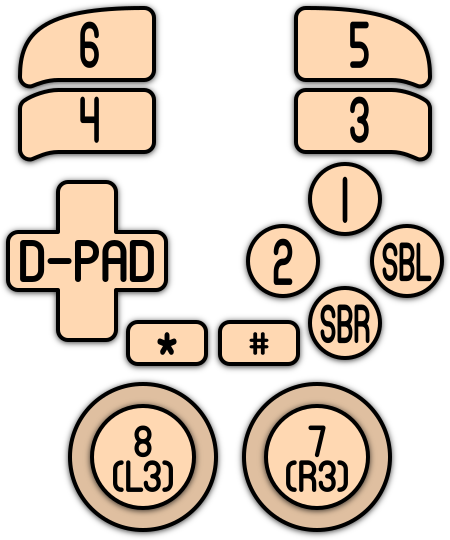
The original controller has 2 side buttons (Side Button Left and Side Button Right) and a keyboard with 10 numeric values and 2 symbols.
The default button mapping for the ColecoVision's controls is as follows:
| Gamepad button | ColecoVision function |
|---|---|
| D-Pad Up | Coleco 1 |
| D-Pad Down | Coleco 2 |
| D-Pad Left | Coleco 3 |
| D-Pad Right | Coleco 4 |
| A (East) | Coleco 5 |
| B (South) | Coleco 6 |
| X (North) | Coleco 7 |
| Y (West) | Coleco 8 |
| R2 | Coleco 9 |
| L2 | Coleco 0 |
| R (R1) | Coleco Button 1 (Side Right) |
| L (L1) | Coleco Button 2 (Side Left) |
| Select | Coleco * (Star) |
| Start | Coleco # (Hash) |
Troubleshooting
For further troubleshooting, refer to the generic support pages.