This is an old revision of the document!
Help with Translation
Batocera comes in a variety of local languages, and relies on the community to help with the translations. We need you for this!
For translators
- First check if someone has already started a translation on the translations page.
- If not, congratulations, you can start a brand new one! You can download the current translation files from the first line in the table (.POT is a PO text file with all the strings to be translated). There are actually two files:
- For EmulationStation-specific lines: https://github.com/batocera-linux/batocera-emulationstation/blob/master/locale/emulationstation2.pot
- If you are improving an existing translation, you can check the current translation status by referring to the translations table and see:
- the list of missing strings to be translated with their respective line numbers when clicking on the number in the columns ES missing and Options missing respectively.
- the current state of the translation files, which can be downloaded from the ES files and Options files columns respectively.
- If you see a “timer” icon after the file, it means that someone just uploaded a new translation file that hasn't been merged into GitHub yet.
- Make your translation edits (your translation should be in the
msgstr “”part in the double-quotes (“”)) and save the file. - Please compile your
emulationstation2.pofile intoemulationstation2.mo(orbatocera-es-system.pointobatocera-system-system.mo) and double check for errors. You can use the Poedit program on your desktop, or online with the Poeditor tool to create theemulationstation2.poandemulationstation2.mofiles specific to your language. - If you use a text editor to make your modifications, please make sure it keeps the Unix line terminations. You can use Notepad++, or Vim or Emacs, but not Wordpad or most default Windows text editors.
- Test your translation; ensure no lines are cut-off in the UI and that special characters appear as intended.
- Once you're happy with your translation, you can submit a PR via Github, or click on the Code letters of your local language to have a menu open letting you upload your
.pofiles. Only the.pofiles need to be uploaded, not the.mofiles. - If it's a brand new language, please contact the dev team on the #translations channel of our Discord server to get your language added to the translations table.
Thank you so much for your help!
Test your translation
- Merge the
emulationstation2.poandbatocera-es-system.pofiles in your preferred editor and export theemulationstation2.mofile from it. - Copy your
emulationstation2.mofile to/usr/share/locale/<your language code>/LC_MESSAGES/– for instance/usr/share/locale/pt_BR/LC_MESSAGES/emulationstation2.mofor Brazilian Portuguese. - On a keyboard connected to the Batocera machine, press
[Alt]+[F4](or runbatocera-es-swissknife --restartif in SSH). - You will see your translated strings.
To keep your changes persistent between reboots, connect via SSH if you haven't already and run batocera-save-overlay to save the overlay.
For developers
Manually add in a line to be translated
If there is a line in EmulationStation that does not have a string entry in the PO file, then it can be manually added in with the fake_gettext library:
#define fake_gettext_stringname pgettext("category", "string")
For example:
#define fake_gettext_flatten_glow pgettext("game_options", "FLATTEN-GLOW")
Place this into the top of the function which contains the untranslated string and upon next compilation it will be added to all the relevant PO files.
Add a comment in the code for translators
If you are coding something new in Batocera and think that the string to be translated might be a bit ambiguous for translators (remember, they will only see the string in isolation, which might not make sense outside of its context), you can add a comment just for translators to see when they get to that string. In EmulationStation or Batocera's es_features, add the following comment right before the code in which the string appears:
/* TRANSLATION: Short comment that explains the context of the string. */
For example, this is something that has been added to batocera-emulationstation/es-app/src/guis in the source code:

Blacklisted words
What if you want to add in a string that's explicitly not meant to be translated, such as a proper noun, technical code string or the model name of a retro system?
Most of these kinds of strings should be automatically picked up and removed by the createEsTranslations function in https://github.com/batocera-linux/batocera.linux/blob/master/package/batocera/emulationstation/batocera-es-system/batocera-es-system.py, however there might come a case where a word fails to fall into one of its filters.
Such words can be manually appended to https://github.com/batocera-linux/batocera.linux/blob/master/package/batocera/emulationstation/batocera-es-system/locales/blacklisted-words.txt in the source code. Just add the word on a new line, simple as that.
What if I wanted to edit an English string?
Generally editing already-existing English strings in the CPP files is discouraged, as it will remove the translation that was made for it (if it exists). However, there may be times when the English string is misspelled or just plain incorrect and needs to be amended, despite it already being translated.
The best way to go about this is to compile batocera-emulationstation, as that will automatically run the xgettext and msgmerge submodules used to generate the emulationstation2.pot and subsequent PO files. You can then use a program like POEdit or just a plain text-editor to restore the translations (old translations are moved to being comments).
Understandably, this is a lot of work, especially with how many languages Batocera supports. So here's a mini-tutorial on how to automate the process (on Windows):
This method does cause corruption when re-imported back into POEdit, so double check that first before re-merging.
- Download and install the Find and Replace tool and Notepad++.
- Run
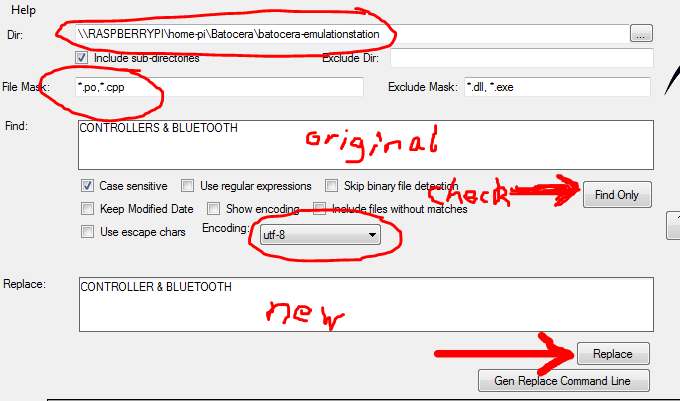
fnr.exefrom the ZIP file. - Set the Dir to the root of the
batocera-emulationstationfolder. - Add
*.poto your File Mask. If you want to also use this tool to edit the string in the CPP itself, you can instead use*.po,*.cpp. - Set Encoding to
utf-8. Note that this isn't actually the correct encoding, but it's close enough. - Put in the original string you want to replace into the Find textbox.
- Click Find Only to test to see which strings it finds. This is important, especially if also editing CPP files, as it ensures you aren't accidentally overwriting code. If you want to be safe, enclose your find text in double-quotes (“”).
- Put in the new string you want to replace it with into the Replace textbox.
- Click Replace (the button… not the textbox label).
If you aren't sure of the setup, here's a professional grade pictograph detailing the settings that have been changed from default:
Since you've already cloned batocera-emulationstation, you can just push the PR to merge it. But what's this? You've noticed that after running git diff (as every good developer does before merging a commit I'm sure), every file you've edited now has an additional, invisible character at the beginning that you're sure you didn't insert yourself? That's because Find and Replace is actually not so good with encoding text files so it inserts the Windows 16-bit signature into all the UTF-8 text files at the beginning. This is easy enough to fix.
- Open the afflicted text file with Notepad++.
- Click Encoding → UTF-8. You'll notice that it was originally on “UTF-8-BOM”.
- Save the file.
- Rinse and repeat for all afflicted text files.
This should get rid of the extra character at the beginning of the text files.
- help_with_translation.1675903207.txt.gz
- Last modified: 3 years ago
- by lbrpdx