This is an old revision of the document!

Nintendo Game & Watch
The Game & Watch is a series of self-contained handheld LCD games by Nintendo, in which the first one was released all the way back on April 28, 1980. They are often seen as the precursor to the Game Boy/Color, although new Game & Watch games were still being released as late as 1991.
This system scrapes metadata for the “gameandwatch” group(s) and loads the gameandwatch set from the currently selected theme, if available.
Grouped with the “lcdgames” group of systems.

Quick reference
.mgb may also be supported, needs confirmation
- Accepted ROM formats:
.mgw,.zip,.7z - Folder:
/userdata/roms/gameandwatch
| Emulators | Accepted ROM formats |
|---|---|
| libretro/gw | |
| mame | .zip, .7z |
BIOS
No Game & Watch emulator in Batocera needs a BIOS file to run.
ROMs
Place your Game and Watch ROMs in /userdata/roms/gameandwatch.
Emulators
RetroArch
RetroArch (formerly SSNES), is a ubiquitous frontend that can run multiple “cores”, which are essentially the emulators themselves. The most common cores use the libretro API, so that's why cores run in RetroArch in Batocera are referred to as “libretro/(core name)”. RetroArch aims to unify the feature set of all libretro cores and offer a universal, familiar interface independent of platform.
RetroArch configuration
RetroArch offers a Quick Menu accessed by pressing [HOTKEY] +  which can be used to alter various things like RetroArch and core options, and controller mapping. Most RetroArch related settings can be altered from Batocera's EmulationStation.
Standardized features available to all libretro cores: gameandwatch.videomode, gameandwatch.ratio, gameandwatch.smooth, gameandwatch.shaders, gameandwatch.pixel_perfect, gameandwatch.decoration, gameandwatch.game_translation
ES setting name batocera.conf_key | Description ⇒ ES option key_value |
|---|---|
| Settings that apply to all cores of this emulator | |
GRAPHICS BACKEND gameandwatch.gfxbackend | Choose your graphics rendering ⇒ OpenGL opengl, Vulkan vulkan. |
AUDIO LATENCY gameandwatch.audio_latency | Audio latency in milliseconds, turn it up if you hear crackles ⇒ 256 256, 192 192, 128 128, 64 64, 32 32, 16 16, 8 8. |
THREADED VIDEO gameandwatch.video_threaded | Improves performance at the cost of latency and more video stuttering. Use only if full speed cannot be obtained otherwise. ⇒ On true, Off false. |
libretro/gw
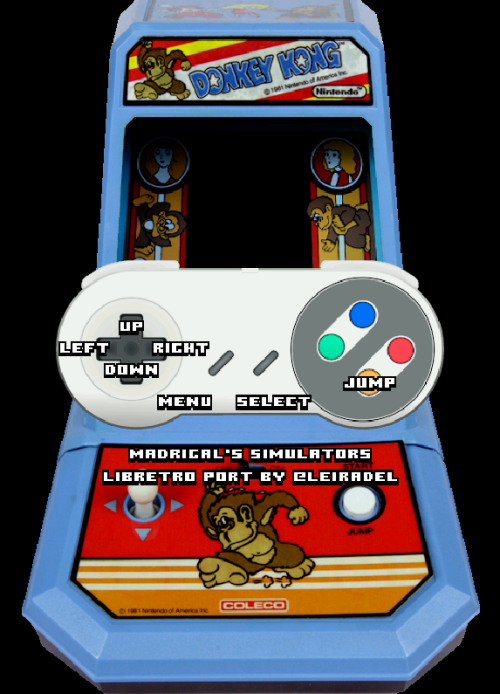
gw-libretro is a simulator and not an emulator. This means that the games that can be played with it aren't actually the original games, but recreations of the games combined with the original artwork and an image of the handheld.
libretro/gw configuration
There are no specific configuration settings for this emulator.
MAME
MAME configuration
Standardized features available to all cores of this emulator: gameandwatch.videomode, gameandwatch.decoration, gameandwatch.padtokeyboard
ES setting name batocera.conf_key | Description ⇒ ES option key_value |
|---|---|
| Settings that apply to all cores of this emulator | |
GRAPHICS BACKEND gameandwatch.video | Choose your graphics rendering ⇒ BGFX bgfx, Accel accel, OpenGL opengl. |
BGFX BACKEND gameandwatch.bgfxbackend | Choose your graphics API ⇒ MAME Detect automatic, OpenGL opengl, OpenGL ES gles, Vulkan vulkan. |
BGFX VIDEO FILTER gameandwatch.bgfxshaders | Apply a particular visual effect ⇒ Off None, Bilinear default, CRT Geom crt-geom, CRT Geom Deluxe crt-geom-deluxe, Super Eagle eagle, HLSL hlsl, HQ2X hq2x, HQ3X hq3x, HQ4X hq4x. |
CRT SWITCHRES gameandwatch.switchres | CRT monitor SwitchRes support ⇒ Off 0, On 1. |
TATE MODE gameandwatch.rotation | Rotating display to vertical mode rendering ⇒ Off None, Rotate 90 autoror, Rotate 270 autorol. |
ALT DPAD MODE gameandwatch.altdpad | If the D-Pad does not work properly ⇒ Off (Default) 0, DS3 Orientation 1, X360 Orientation 2. |
Controls
The inputs are game specific. Press START to get an overlay like the following example:
- systems/gameandwatch.1637976485.txt.gz
- Last modified: 5 years ago
- by atari