This is an old revision of the document!
Nintendo Entertainment System
The Nintendo Entertainment System, known as the Nintendo Famicon in Japan with a radically different design, is an 8-bit third-generation video game console released by Nintendo in Japan in 1983. It was redesigned as the NES and released two years later in the US, retailing for $179.99. Debatably the first majorly successful video game console after the <href North American video game crash of '83, probably why it looks more like a VCR than a console.
The original Famicom had the Family Computer Disk System add-on released for it which allowed playback of games on higher capacity discs which commonly featured enhanced sound capabilities. Since the NES had a delayed release, it included additional mapping hardware negating the need for the add-on, albeit without the sound enhancements. Many Famicom disk-only games were ported to cartridge form for their US release.
For emulation of Famicom disks specifically, use the fds folder instead.
Emulation of the NES is pretty well established. If your machine can only emulate one system at full speed, it will be this. Choice of emulator doesn't particularly matter, they're all good nowadays. MAME can emulate the Vs. Dualsystem cabinet, but if this your first time hearing about that don't worry about it.
| shortname | nes |
|---|---|
| emulator/core(s) | libretro/fceumm libretro/nestopia |
| rom format(s) | .nes .unif .unf .zip 7z |
Emulators
libretro/fceumm
FCE Ultra “mappers modified” is a libretro-maintained fork of FCE Ultra. High compatibility. A small amount of early romhacks may only work in this emulator.
Configuration
| setting | description | recommendation |
|---|---|---|
| fceumm_nospritelimit | The NES has an 8 sprite limit per line, when this is exceeding the remaining sprites are flickered between (or sometimes just don't show up at all!) This setting removes that limit. | disabled Enabling it has no ill effect in most games but is less accurate to the original experience. |
| nes.fceumm_palette |  <description> <description> | default <rec> |
| nes.fceumm_ntsc_filter | The emulator has the Blarg NTSC filter built-in, unrelated to the shader preset you can choose within Batocera. | Off You can use one of the presets inside Batocera instead. |
| nes.fceumm_sndquality | <desc> Default High Higher | Default <rec> |
| nes.fceumm_overclocking | Overclocks the emulated PPU. This can be used to avoid console slowdown, but some games encounter glitches with it on. 2x-Postrender applies the overclock after rasterization. 2x-vblank applies the overclock during the blanking period. | disabled Enabling can cause game crashing and save data erasure. |
libretro/nestopia
A fork of Nestopia, Nestopia Undead Edition is the bug-fixed revival of the emulator. High compatibility and accuracy.
Configuration
| setting | description | recommendation |
|---|---|---|
| <setting> | <desc> | <rec> |
Configuration for all emulators
| setting | description | recommendation |
|---|---|---|
nes.controller1_nes | Choose wha is plugged into port 1. 1 for autodetect, 513 for a regular NES controller and 258 for a NES Zapper (requires mouse). | 1 unless otherwise needed. |
nes.controller2_nes | Choose what is plugged into port 2. 1 for autodetect, 513 for a regular NES controller, 258 for a NES Zapper (requires mouse) and 514 for the Arkanoid paddle. | 1 unless otherwise needed. |
ROMs
.nes for cartridges, .fds for Famicom discs. Although the emulators can emulate both NES cartridges and Famicom disks just fine, Batocera has the systems split up into two separate entries, nes for NES and fds for Famicom. Put your roms in their respective folders, and then if you want you can group the systems inside of EmulationStation so that they share a menu.
The ROMs are pretty easy to mod as well, just open them up in a tile editor and you'll see all the game/sprite data stored in 8×8 pixel tiles. Level layout changes typically require a specialised level editor program for that game (if there even is one).
Controls
The NES had many accessories, most of which cannot be configured inside of Batocera but can be configured in RetroArch's Quick Menu (Hotkey+South) > Inputs. This can be saved per game via Quick Menu > Overrides > Save Game Override.
Of the controllers Batocera supports configuring, the NES Zapper uses the current mouse cursor as input. This can be emulated using the Mayflash Dolphinbar with a Wiimote for a more authentic experience. Traditional Zappers cannot be supported with modern displays (they relied on reading phosphors burning in the CRT and cannot “see” modern LCD screens).
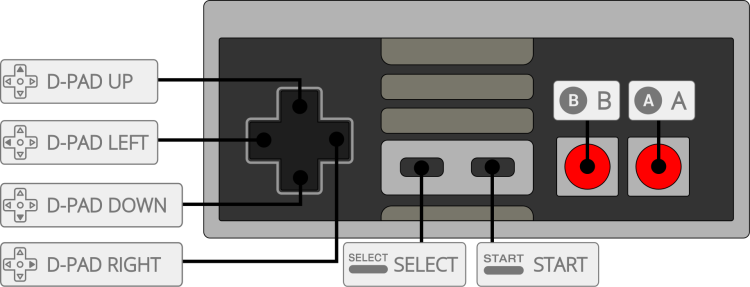
The default button mapping to the NES controller is as follows:
- systems/nes.1628052366.txt.gz
- Last modified: 5 years ago
- by atari