This is an old revision of the document!

FinalBurn Neo
The FinalBurn Neo is a specialized multi-arcade emulator forked from FinalBurn Alpha after… stuff happened. It was released in 2019.
Due to the complex nature of the situation, Batocera refers to FBNeo and FBAlpha almost interchangeably. And to add to the complexity, FBNeo shares a lot of characteristic with MAME as well. It's worth reading the arcade guide to become familiar with how arcade games in general work first.
This system scrapes metadata for the “arcade” group(s) and loads the fbneo set from the currently selected theme, if available.

Quick reference
- Folders:
/userdata/roms/fbneo,/userdata/roms/neogeo - Accepted ROM formats:
.zip,.7z
| Emulators |
|---|
| libretro: FBAlpha |
| libretro: FBNeo |
| fba2x |
BIOS
FBNeo requires certain BIOS files to be placed in /userdata/roms/fbneo instead. These are:
neogeo.zippgm.zipskns.zip
ROMs
Place your Final Burn Neo ROMs in /userdata/roms/fbneo. You can also place your NeoGeo games in this folder as well, but if you'd like to organize them into their own “system” you can place them in /userdata/roms/neogeo instead. This will make them appear as a dedicated system in EmulationStation.
The romset used in Batocera's FBNeo is not updated as frequently as the latest MAME romset is. The current FBNeo romset used is 1.0.0.0 and probably will be for a while, unless some major developments within Batocera happen.
The ROMs themselves should not be decompressed, FBNeo expects them in their provided .zip/.7z format.
Emulators
RetroArch
RetroArch (formerly SSNES), is a ubiquitous frontend that can run multiple “cores”, which are essentially the emulators themselves. The most common cores use the libretro API, so that's why cores run in RetroArch in Batocera are referred to as “libretro: (core name)”. RetroArch aims to unify the feature set of all libretro cores and offer a universal, familiar interface independent of platform.
RetroArch configuration
RetroArch offers a Quick Menu accessed by pressing [HOTKEY] +  which can be used to alter various things like RetroArch and core options, and controller mapping. Most RetroArch related settings can be altered from Batocera's EmulationStation.
Standardized features available to all libretro cores: fbneo.videomode, fbneo.ratio, fbneo.smooth, fbneo.shaders, fbneo.pixel_perfect, fbneo.decoration, fbneo.game_translation
ES setting name batocera.conf_key | Description ⇒ ES option key_value |
|---|---|
| Settings that apply to all cores of this emulator | |
GRAPHICS BACKEND fbneo.gfxbackend | Choose your graphics rendering ⇒ OpenGL opengl, Vulkan vulkan. |
AUDIO LATENCY fbneo.audio_latency | Audio latency in milliseconds, turn it up if you hear crackles ⇒ 256 256, 192 192, 128 128, 64 64, 32 32, 16 16, 8 8. |
THREADED VIDEO fbneo.video_threaded | Improves performance at the cost of latency and more video stuttering. Use only if full speed cannot be obtained otherwise. ⇒ On true, Off false. |
libretro: FBAlpha
a.k.a. fbalpha2012, this is an older build of FinalBurn Alpha that performs better on weaker SBCs like the RPi Zero.
Todo for this emulator: like everything.
libretro: FBNeo
A libretro port of FinalBurn Neo is a specialized multi-arcade emulator forked from Final Burn Alpha after… stuff happened. This is the most current version of FBNeo available in Batocera.
libretro: FBNeo configuration
ES setting name batocera.conf_key | Description ⇒ ES option key_value |
|---|---|
| Settings that apply to all systems this core supports | |
CPU CLOCK global.fbneo-cpu-speed-adjust | Can fix native system slowdowns in some games ⇒ 30% 30%, 40% 40%, 50% 50%, 60% 60%, 70% 70%, 80% 80%, 90% 90%, 100% 100%, 110% 110%, 120% 120%, 130% 130%, 140% 140%, 150% 150%, 160% 160%, 170% 170%, 180% 180%, 190% 190%, 200% 200%. |
FRAMESKIP global.fbneo-frameskip | Skip frames to improve performance (smoothness) ⇒ No skipping 0, Skip rendering of 1 frames out of 2 1, Skip rendering of 2 frames out of 3 2, Skip rendering of 3 frames out of 4 3, Skip rendering of 4 frames out of 5 4. |
CROSSHAIR (LIGHTGUN) global.fbneo-lightgun-hide-crosshair | Show crosshair if playing with a lightgun device ⇒ Off enabled, On disabled. |
| Settings specific to neogeo | |
NEOGEO MODE neogeo.fbneo-neogeo-mode-switch | Load appropriate Bios depending on your choice ⇒ Console AES World AES Asia, Console AES Japan AES Japan, Arcade MVS Europe MVS Asia/Europe, Arcade MVS USA MVS USA, Arcade MVS Japan MVS Japan, Arcade Universe BIOS (Cheats) Universe BIOS. |
MEMORY CARD MODE neogeo.fbneo-memcard-mode | Change the behavior for the memory card ⇒ Off disabled, Shared shared, Per-game per-game. |
fba2x
A standalone version of Final Burn Alpha, this is a specialized fork of an older build of FBAlpha that performs better on weaker SBCs like the RPi Zero.
Todo for this emulator: like everything.
How is this different from MAME?
It's… complicated and no paragraph long block on a random wiki can properly explain it, so take the rest of this with caution. But the general agreement between users is that FBNeo “focuses” more on speed and performance than MAME, though in practice there aren't many cases where one emulator performs better than another on the same game (with the same versioning, settings, etc.). FBNeo also has a smaller supported library, but still supports an impressively large number of games.
When it boils down to the pragmatic differences, if you're having issues with an arcade game it's worth trying it out from sets for both MAME and FBNeo to see if one does better than the other. Some people may also prefer the simpler romset conventions that FBNeo uses.
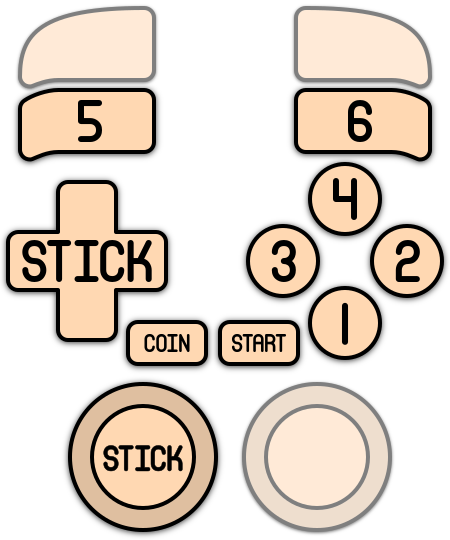
Controls
Here are the default Final Burn Neo's controls shown on a Batocera Retropad:
Troubleshooting
Further troubleshooting
Most questions are answered in the generic arcade guide.
For further troubleshooting, refer to the generic support pages.
- systems/fbneo.1638612718.txt.gz
- Last modified: 5 years ago
- by atari