This is an old revision of the document!

MAME
MAME, the Multiple Arcade Machine Emulator, is a multi-purpose emulation framework which facilitates the emulation of vintage hardware and software. Originally targeting vintage arcade machines, MAME has since absorbed the sister-project MESS (Multi Emulator Super System) to support a wide variety of vintage computers, video game consoles and calculators as well.
It was first released in 1997. In Italy!
MAME focuses on accuracy, even if it's at the cost of performance. If on low-end hardware, consider using older (more innaccurate) versions of MAME, or specialized emulators for such games instead.
MAME games scrapes metadata for the “arcade” group(s) and loads the mame set from the currently selected theme, if available.

MAME doesn't use an individual “core” for each system like RetroArch does, instead the ROM itself usually contains the necessary information to accurately emulate it, thus making it specific to the version of MAME it was made for. It is highly recommended to read the generic arcade guide first to get familiar with arcade machine emulation.
Quick reference
- Accepted ROM formats:
.zip,.7z - Folder:
/userdata/roms/mame
| Emulators | Sample path | Artwork path |
|---|---|---|
| libretro: imame4all |  | |
| libretro: mame078plus | /userdata/bios/mame2003plus/samples | /userdata/bios/mame2003plus/artwork |
| libretro: mame0139 | /userdata/bios/mame2010/samples | /userdata/bios/mame2010/artwork |
| libretro: mame | /userdata/bios/mame/samples | ''/userdata/bios/mame/artwork | |
| mame | /userdata/bios/mame/samples | /userdata/bios/mame/artwork |
BIOS
Based on the romset type used, either none is required, ones are required for each game you need to play, or a single BIOS file is needed for a group of games.
Samples
Some arcade game machines featured additional storage that allowed for uncompressed audio to be utilized. These are referred to as “samples”. Some machines had a backup synthesized track if the samples weren't present, others had none.
For MAME2003plus (mame078plus), if your game has the appropriate samples, place them in /userdata/bios/mame2003/samples folder. Samples can be for one specific game, or be applicable to multiple versions of the game.
ROMs
Place your MAME ROMs in /userdata/roms/mame. If you'd like to, you could put ROMs intended for different versions of MAME into subfolders in this folder. For instance, you could put MAME2003-plus ROMs into the /userdata/roms/mame/mame2003plus. The latest versions of which ROMset to use can be found on the arcade guide.
Each romset is specific to the version of MAME being used:
- 0.37b5 ROMset for the libretro: imame4all version
- 0.78plus ROMset for the libretro: mame078plus version
- 0.139 ROMset for the libretro: mame0139 version
For MESS supported systems, each system has its own folder to use. Putting games designed for the MESS system inside of the mame/ folder will not work.
Emulators
RetroArch
RetroArch has its own page.
libretro: imame4all
iMame4All is an old version of MAME that's fairly easy to run, even on hardware as weak as the RPi Zero. Many games, especially newer ones, have known issues with this version. Supports the least number of games.
The ROMset for this version may be referred to as “0.37b5”.
libretro: imame4all configuration
libretro: mame078plus
Not to be confused with the regular MAME2003.
Internally using the name “mame078plus”, MAME2003plus is an old version of MAME that became the “golden standard” for a while. A mixture of being easy to run while supporting the most hardware. Many ROMs, especially newer systems, have known issues with this version.
The “plus” version has had recent developments that don't break compatibility backported from newer versions of MAME. For this reason, regular MAME2003 ROMs may not work in this version.
The ROMset for this version may be referred to as “078plus”.
libretro: mame078plus configuration
ES setting name batocera.conf_key | Description ⇒ ES option key_value |
|---|---|
| Settings that apply to all systems this core supports | |
CONTROL MAPPING global.mame2003-plus_analog | Choose from Analog or Digital controller ⇒ Analog analog, Digital digital. |
FRAMESKIP global.mame2003-plus_frameskip | Skip frames to improve performance (smoothness) ⇒ Off 0, 1 1, 2 2, 3 3, 4 4, 5 5. |
INPUT INTERFACE global.mame2003-plus_input_interface | Use input directly sends by keyboard to the core ⇒ Retropad retropad, Keyboard keyboard, Simultaneous simultaneous. |
TATE MODE global.mame2003-plus_tate_mode | Rotating display to vertical mode rendering ⇒ Off disabled, On enabled. |
NEOGEO MODE global.mame2003-plus_neogeo_bios | Manually specify your choice of Neo Geo BIOS ⇒ Console AES World asia-aes, Arcade MVS Europe euro, Arcade MVS USA us, Arcade MVS Japan japan, Arcade Universe BIOS 4.0 (Cheats) unibios40, Arcade Universe BIOS 3.3 (Cheats) unibios33. |
libretro: mame0139
Internally using the name “mame0139”, Mame2010 is an old version of MAME that's a combination of fast and compatible.
The ROMset for this version may be referred to as “0.139”.
libretro: mame
The latest version of MAME at the time of stable's release. Check out the table on the arcade guide for the current version.
libretro: mame configuration
ES setting name batocera.conf_key | Description ⇒ ES option key_value |
|---|---|
| Settings that apply to all systems this core supports | |
CPU OVERCLOCK global.mame_cpu_overclock | Minimize in-game slowdowns of some games ⇒ default default, 30 30, 35 35, 40 40, 45 45, 50 50, 55 55, 60 60, 65 65, 70 70, 75 75, 80 80, 85 85, 90 90, 95 95, 100 100, 105 105, 110 110, 115 115, 120 120, 125 125, 130 130, 135 135, 140 140, 145 145, 150 150. |
VIDEO RESOLUTION global.mame_altres | Increase the video resolution ⇒ 640×480 640×480, 800×600 800×600, 960×720 960×720, 1024×768 1024×768, 1280×720 1280×720, 1600×800 1600×800, 1920×1080 1920×1080, 2560×1440 2560×1440, 3840×2160 3840×2160. |
Further adjustments can be made to the /userdata/bios/mame.ini file.
MAME
If you're having issues with a specific game, check the MAMEdev FAQ for that game here. For MESS systems specifically, you might find more information on MESS's wiki.
Be sure to remember to update the ROMset when updating Batocera, as this version is bumped every stable version.
MAME configuration
Standardized features available to all MAME systems: mame.videomode, mame.decoration, mame.padtokeyboard
ES setting name batocera.conf_key | Description ⇒ ES option key_value |
|---|---|
| Settings that apply to all cores of this emulator | |
GRAPHICS BACKEND mame.video | Choose your graphics rendering ⇒ BGFX bgfx, Accel accel, OpenGL opengl. |
BGFX BACKEND mame.bgfxbackend | Choose your graphics API ⇒ MAME Detect automatic, OpenGL opengl, OpenGL ES gles, Vulkan vulkan. |
BGFX VIDEO FILTER mame.bgfxshaders | Apply a particular visual effect ⇒ Off None, Bilinear default, CRT Geom crt-geom, CRT Geom Deluxe crt-geom-deluxe, Super Eagle eagle, HLSL hlsl, HQ2X hq2x, HQ3X hq3x, HQ4X hq4x. |
CRT SWITCHRES mame.switchres | CRT monitor SwitchRes support ⇒ Off 0, On 1. |
TATE MODE mame.rotation | Rotating display to vertical mode rendering ⇒ Off None, Rotate 90 autoror, Rotate 270 autorol. |
ALT DPAD MODE mame.altdpad | If the D-Pad does not work properly ⇒ Off (Default) 0, DS3 Orientation 1, X360 Orientation 2. |
MAME offers a Menu in-game (push in [L3] + [R3] or press [HOTKEY] +  ). This can be used to manually adjust inputs or game settings. Alternatively, all of MAME's options can be edited by opening the
 /userdata/system/configs/mame/mame.ini file (you may need to create this file if it's not already present).
Sega Model 1

This infamous Model 1 arcade board was a dramatic step-up above the competition in regards to 3D polygonal graphics. Thousands of vector-shaded polygons being drawn on-screen at once, with extremely responsive 60 FPS arcade feel (for some games).
Emulation for the Model 1 is sadly not that mature yet (such as slowdown, graphical inaccuracies and random crashes), however if you have a powerful enough machine you should be able to power through it. Model 1's ROMs are best played on MAME 2010 or newer.
There were only seven games (in reality, five with different variations) produced for this arcade board, most likely due to its prohibitive cost of development for each game:
| Game | MAME 2010 Filename | Additional information |
|---|---|---|
| Netmerc/Tecwar | N/A | On-rails first-person virtual-reality shooter played with a HMD and mounted gun which was never released. Considered the “holy grail” of Sega Model 1. This game cannot be emulated yet by any emulator in Batocera. |
| Star Wars Arcade | swa.zip | A tie-in game for the films of the era. Quite impressive for the time. |
| Virtua Fighter | '''' | Infamous 3D fighting game that would go on to get several ports onto home consoles. Renown for its weighty, realistic animations. |
| Virtua Formula | vformula.zip | An enhanced edition of Virtua Racer, featuring six player network play and formula one shaped rides. |
| Virtua Racer | vr.zip | Circuit racer leaning more towards an arcade experience than the simulation of other 3D racer games of the era. |
| Wing War | wingwar.zip | Arcade dogfighting game where two players take turns attacking and defending each other. |
| Wing War R360 | '''' | A special version with a 360 degree rotating cockpit. Extremely rare and expensive. |
Controls
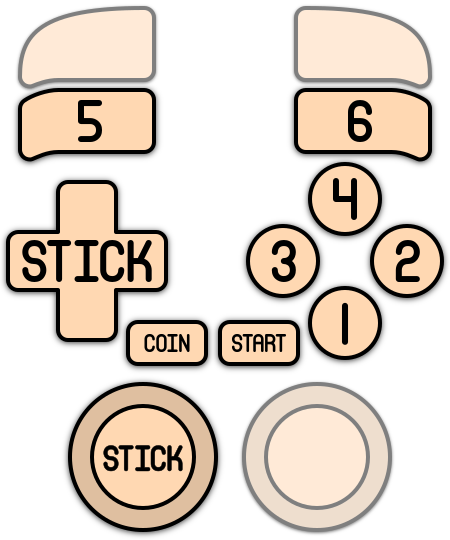
Here are the default MAME's controls shown on a Batocera Retropad:
Troubleshooting
MAME is a very complicated project and issues can crop up easily.
None of my games are booting!
First check that the version of MAME you're attempting to run it with is the same as the ROMset you got it from. Mismatched versions aren't guaranteed to run, though sometimes if there were no differences made between MAME versions the game can run in both versions (though that's generally an exception, not the rule).
I have an issue with a specific game
If you're having issues with a specific game, check the MAMEdev FAQ for that game here. For MESS systems specifically, you might find more information on MESS's wiki.
Poor game performance
Arcade games tend to be more difficult to emulate than regular console games in general by their very nature.
With that said, newer versions of MAME emulate these arcade games more accurately than older versions. This generally means that real-world performance takes a dip as more accuracy to the emulation is added (although in some cases, it can dramatically improve performance, really it's on a game-by-game basis).
If your machine is struggling with running a particular game, try using an older set with its respective version of MAME, it may perform better. Just remember to make that special per-game setting to actually utilize the correct MAME version if deciding to go down this route!
I can't open the MAME menu!
Sometimes the key needed to be pressed to access the in-game MAME menu is different depending on which version of MAME you are using. Typically, these keys can be:
- Pushing in
[L3]or[R3] - One of the shoulder buttons/triggers
[Tab]on the keyboard
If you are specifically using a libretro: Mame core, you can manually activate the MAME menu by going to RetroArch's Quick Menu ([HOTKEY] + ) → Options → System → Display MAME Menu. Once this option is activated, exit out of the Quick Menu and you will be greeted by MAME's menu. Repeat these actions to close the menu.
I open the MAME menu too often!
Aforementioned issue, you might have the MAME key set to an in-game key as well. Either set it to another key or remap the MAME menu key.
Further troubleshooting
Most questions are answered in the generic arcade guide.
For further troubleshooting, refer to the generic support pages.
- systems/mame.1664871420.txt.gz
- Last modified: 4 years ago
- by atari