Properly Shutdown Batocera
Shutting down any computer system improperly can lead to data loss and malfunction. Batocera is no exception! Be sure to shutdown properly when finished retrogaming, and avoid yanking the power cord or otherwise forcing a hard shutdown.
To properly shutdown the Batocera system, use any of the following methods:
- From the main EmulationStation system selection page or any game selection page, press
[START]on the controller or[Spacebar]on the keyboard, then use the D-pad or arrow keys along with or
or [Enter]to navigate: MAIN MENU → QUIT → SHUTDOWN SYSTEM.
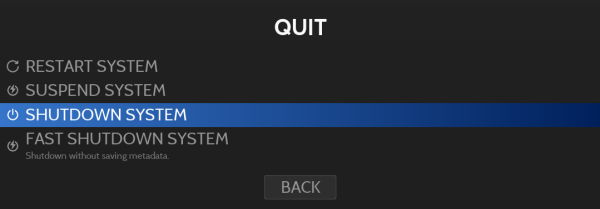
- From the main EmulationStation system selection page, press
[SELECT]on the controller or[Backspace]on the keyboard, then use the D-pad or arrow keys along with or [Enter]to navigate: QUICK ACCESS → SHUTDOWN SYSTEM.
- Access a command shell prompt with SSH or Xterm, or from anywhere in Batocera including in a game, press
[Ctrl]+[Alt]+[F3]on the keyboard to get to a virtual terminal. Type this command (followed by[Enter]):batocera-es-swissknife --shutdown
- Press the soft power button briefly (
 this does not work correctly in all hardware configurations).
- user/maximumentropy.txt
- Last modified: 4 years ago
- by maximumentropy