
Sega Lindbergh
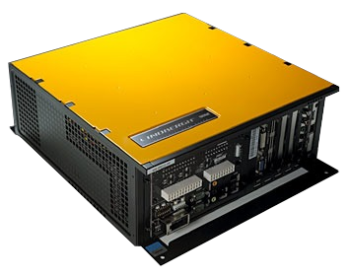
The Sega Lindbergh is an arcade developed by Sega. It was launched in 2005. Designed to be the successor to the Sega NAOMI 2, Lindbergh is the first arcade machine of many to be based on PC architecture with linux OS instead of a home console based on Xbox 360. Features arcade games like After Burner Climax, House of the Dead 4 and OutRun 2 SP SDX.
Five variants were made, each with their own color: Yellow, Red, Red EX, Blue and Silver. For more information about this arcade machines, the article on Sega Retro provides much of it.
This system scrapes metadata for the “lindbergh” and “arcade” groups and loads the lindbergh set from the currently selected theme, if available.
Quick reference
- Emulator: Sega Lindbergh loader
- Folder:
/userdata/roms/lindbergh - Accepted ROM formats:
.game
BIOS
No Sega Lindbergh emulator in Batocera needs a BIOS file to run.
ROMs
Lindbergh loader doesn't allow any space in file or folder name. Use underscore instead.
Place your Sega Lindbergh ROMs in /userdata/roms/lindbergh. For Batocera to detect a game, you must have a blank file with '.game' extension in the location where the rom will execute from. For best compatibility, use game ID from the working games list below as the file name.
i.e.: for Ghost Squad Evolution game, create ghostev.game in the /userdata/roms/lindbergh/Ghost_Squad_Evolution/vsg_l directory.
Some games (mostly driving) require extra options in the test menu. You can skip it by making sure your game has the exact same revision (e.g.: initiad5exa.game if you have Initial D 5 (Export) (2.0)) as mentioned in the game list below.
Lindbergh Game Installer Script
You also have the option to use the Lindbergh Game Installer Script to automate the installation of your Lindbergh games. Prerequisites include having dumps in .bin format. Please consult the readme for more information.
Emulators
Sega Lindbergh loader
As of Batocera v42, the Lindbergh system is supported, including light gun and steering wheel devices (force feedback not yet supported).
If you experience control issues with your controller in a game, try enabling SDL2 controller mode.
Games list
| Name | Executable file | Version | Revision | ID | Genre | Working ? | Notes | |
|---|---|---|---|---|---|---|---|---|
| 2 Spicy | apacheM.elf | 2spicy | Gun | ✔ | Left/right d-pad on light guns to go left/right | |||
| After Burner Climax (Export) | abc | Rev B | abclimax | Flight | ✔ | |||
| abc | Rev A | abclimaxa | Flight |  | ||||
| abc | SDX | Rev A | abclimsdx | Flight | ✔ | |||
| abc | SE | Rev A | abclimse | Flight | | |||
| Ghost Squad Evolution | vsg or gsevo | Export | Rev A | ghostsev | Gun | ✔ | ||
| vsg or gsevo | Japan | ghostsevj | Gun | ✔ | ||||
| Harley-Davidson: King of the Road | chopperM.elf | hdkotr | Wheel | ✔ | ||||
| Hummer | a.elf | Rev A | hummer | Wheel | ✔ | |||
| a.elf | SDLX | Rev A | hummerlx | Wheel | | |||
| Hummer Extreme | hummer_Master.elf | Rev A | hummerxt | Wheel | ✔ | |||
| hummer_Master.elf | MDX | Rev A | hummerxtm | wheel | | |||
| Initial D 4 (Export) | id4.elf | Rev D | initiad4ex | Wheel | ✔ | |||
| id4.elf | Rev B | initiad4exb | Wheel | ✔ | ||||
| id4.elf | Rev C | initiad4exc | Wheel | ✔ | ||||
| Initial D Arcade Stage 4 | id4.elf | Rev G | initiad4 | Wheel | ✔ | |||
| id4.elf | Rev A | initiad4a | Wheel | ✔ | ||||
| id4.elf | Rev B | initiad4b | Wheel | ✔ | ||||
| id4.elf | Rev C | initiad4c | Wheel | ✔ | ||||
| id4.elf | Rev D | initiad4d | Wheel | ✔ | ||||
| Initial D 5 (Export) | id5.elf | 4.0 | initiad5ex | Wheel | ✔ | |||
| id5.elf | 2.0 | initiad5exa | Wheel | ✔ | ||||
| id5.elf | 2.0 | Rev A | initiad5exab | Wheel | | |||
| Initial D Arcade Stage 5 | id5.elf | Rev B | initiad5 | Wheel | | |||
| id5.elf | Rev A | initiad5a | Wheel | | ||||
| Let's go Jungle! | lgj_final | Rev B | letsgoju | Gun |  | START button for action | ||
| lgj_final | Rev A | letsgojua | Gun | | ||||
| Let's go Jungle! Special | lgjsp_app | letsgojusp | Gun | ✔ | START button for action | |||
| OutRun 2 SP SDX | Jennifer | outr2sdx | Wheel | ✔ | ||||
| OutRun 2 SP SDX | Jennifer | outr2sdxa | Wheel | | ||||
| OutRun 2 SP SDX | Jennifer | Bootleg | outr2sdxg | Wheel | ✔ | Hacked music track | ||
| Primeval Hunt | main.exe | primevah | Gun | ✔ | ||||
| R-Tuned Ultimate Street Racing | dsr | rtuned | Wheel | ✔ | ||||
| Rambo | ramboM.elf | rambo | Gun | ✔ | ||||
| Sega Race TV | drive.elf | segartv | Wheel | ✔ | ||||
| The House of the Dead 4 | hod4M.elf | Rev C | hotd4 | Gun | ✔ | |||
| hod4M.elf | Rev A | hotd4a | Gun | ✔ | ||||
| hod4M.elf | Rev B | hotd4b | Gun | ✔ | ||||
| The House of the Dead 4 Special | hod4M.elf | Export | hotd4sp | Gun | ✔ | |||
| hod4M.elf | Rev B | hotd4spb | Gun | | ||||
| The House of the Dead EX | hodexRI.elf | hotdex | Gun | ✔ | ||||
| Virtua fighter 5 (Export) | vf5 | vf5 | Fight | ✔ | ||||
| vf5 | Rev A | vf5a | Fight | ✔ | ||||
| vf5 | Rev B | vf5b | Fight | ✔ | ||||
| vf5 | Rev C | vf5c | Fight | ✔ | ||||
| vf5 | Rev D | vf5d | Fight | ✔ | ||||
| Virtua fighter 5 C | vf5 | Public C | Rev E | vf5e | Fight | ✔ | ||
| Virtua fighter 5 Final Showdown | vf5 | 6.0 | Rev B | vf5fs | Fight | ✔ | ||
| vf5 | 1.0 | Rev A | vf5fsa1 | Fight | ✔ | |||
| vf5 | 2.0 | Rev A | vf5fsa2 | Fight | ✔ | |||
| vf5 | 6.0 | Rev A | vf5fsa6 | Fight | ✔ | |||
| vf5 | 1.0 | Rev B | vf5fsb1 | Fight | ✔ | |||
| Virtua fighter 5 R | vf5 | Rev G | vf5r | Fight | ✔ | |||
| vf5 | Rev D | vf5rd | Fight | ✔ | ||||
| Virtua Tennis 3 | vt3 or vt3_Lindbergh | Rev C | vtennis3 | Sport | ✔ | |||
| Virtua Tennis 3 | vt3 or vt3_Lindbergh | Rev A | vtennis3 | Sport | ✔ | |||
| Virtua Tennis 3 | vt3 or vt3_Lindbergh | Rev B | vtennis3 | Sport | ✔ |
Game specific notes
After Burner Climax
NOT BOOTING: Launch Service Menu > Game Assignments > Cabinet Movement: OFF.
THROTTLE LEVER: by default, left and right triggers but only works with SDL2 (not EVDEV).
Ghost Squad Evolution
DISPLAY: There is actually no resolution patch at the moment. Game display is limited to 640×480. Crashes were reported. There is no fix yet.
Initial D 4/5 series
CARD READER ERROR: To bypass card reader check, enable it in emulation station advanced settings.
CONTROLS: Steering control is very sensitive. There is no fix yet.
Let's Go Jungle!
CONTROLS: aiming sensitivity is very high. To reduce this, launch the game in test mode, then go to gun calibration and calibrate the entire screen. Save and quit.
If playing with one light gun, P2 action button is `ACTION` (secondary button).
Let's Go Jungle! Special
CONTROLS: If playing with one light gun, both action buttons are on the dpad. Left dpad for P1 action; right dpad for P2 action.
OutRun 2 SP SDX
DISPLAY: If you have a black screen, limit FPS to 60.
Virtua fighter 5 Final Showdown
DISPLAY: If you have a black screen, limit video mode resolution to 1080p.
Lindbergh loader configuration
| Setting name | Group name | Description |
|---|---|---|
FREE PLAY lindbergh_freeplay | Enable free play for supported games ⇒ Off 0, On 1. |
|
REGION lindbergh_region | Choose the arcade machine console region. May be required to start the game. ⇒ Japan JP, United States US, Export EX. |
|
ASPECT RATIO lindbergh_aspect | Set to keep the aspect ratio (4:3) in games like Sega Race TV and Primeval Hunt. ⇒ Off 0, On 1. |
|
FPS LIMITER lindbergh_limit | Set if you want to limit the FPS in games that are not limited like OutRun2. ⇒ Off 0, On 1. |
|
FPS TARGET lindbergh_fps | Set the target FPS (will only work if FPS LIMITER is enabled). ⇒ 30fps 30, 50fps 50, 60fps (Default) 60, 75fps 75, 100fps 100, 120fps 120. |
|
CONTROLLER MODE lindbergh_controller | Choose the controller configuration. EVDEV for a wide range of controllers, lightguns & steering wheels. SDL2 for gamepads only. ⇒ SDL2 1, EVDEV (default) 2 |
|
HUMMER FLICKER FIX lindbergh_hummer | Game options | Set to on if you experience flickering in Hummer. ⇒ Off 0, On 1. |
OUTRUN LENS GLARE lindbergh_outrun | Game options | Set to enable lens glare in Outrun 2. ⇒ Off 0, On 1. |
BOOST RENDER RES lindbergh_boost | Game options | Upscale rendering resolution to display size. ⇒ Off 0, On 1. |
PRIMEVAL HUNT MODE lindbergh_hunt | Game options | Set the Primeval Hunt mode (touch screen). ⇒ No touch screen 1, side by side 2, 3DS mode (right side) 3, 3DS mode (bottom side) 4 |
CARD READER lindbergh_card | Game options | Enable to emulate the card reader for supported games (e.g.: Virtua Tennis 3 and R-Tuned) ⇒ Off 0, On 1. |
CPU SPEED lindbergh_cpu | Game options | House of the Dead 4 speed fix. Sets the game to the CPU minimum frequency of your processor. ⇒ Off 0, On 1. |
IP ADDRESS lindbergh_ip | Game options | Enable the IP address for supported games (e.g.: OutRun 2) network play against another PC on the same network. ⇒ Off 0, On 1. |
RUN TEST MODE lindbergh_test | Advanced options | Run the game in test mode to configure certain game options. ⇒ Off 0, On 1. |
USE ZINK FOR RENDERING lindbergh_zink | Advanced options | Fixes some shadows and textures in Virtua Tennis 3 and Virtua Fighter 5 franchise for non Nvidia GPUs. May need the FPS limiter option enabled. ⇒ Off 0, On 1. |
DEBUG MODE lindbergh_debug | Advanced options | Add debug logging to help troubleshoot issues. ⇒ Off 0, On 1. |
- systems/lindbergh.txt
- Last modified: 7 months ago
- by tovarichtch